Output missing a space character
I’ve been having a nasty bug lately. It sometimes happened that the HTML output of a page is missing one or two spaces. Like this screenshot, there’s no space between <li and the class attribute…
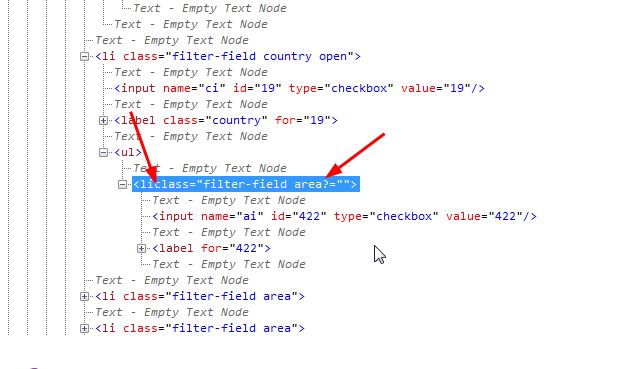
At some point I figured out that if I added spaces or enters in the line above or below the one that faulted, it fixed the problem. But what the problem exactly is… no clue. Even less on how to fix it.
Eventually, after a lot of debugging, I got to the OfficineK.HTMLToolkit module. I didn’t suspect it of anything because the problem occurred whether I set the compression settings on or off. But look at this nifty piece of code:
public override void Write(byte[] buffer, int offset, int count)
{
  var data = new byte[count];
  Buffer.BlockCopy(buffer, offset, data, 0, count);
  string html = _encoding.GetString(buffer);

  if (_cssCompressionEnabled)
    html = HTMLCompressor.CssCompression(html);

  if (_javascriptCompressionEnabled)
    html = HTMLCompressor.JavascriptCompression(html);

  if (_cssInlineCompressionEnabled)
    html = HTMLCompressor.CssInlineCompression(html);

  if (_javascriptInlineCompressionEnabled)
    html = HTMLCompressor.JavascriptInlineCompression(html);

  if (_htmlCompressionEnabled)
    html = HTMLCompressor.HtmlCompression(html);

  byte[] outdata = _encoding.GetBytes(html.Trim());
  _sink.Write(outdata, 0, outdata.GetLength(0));
}
So this piece of code latches onto the outputstream, and can optionally compress it (remove spaces, enters, that sort of thing). It gets a buffered piece of output HTML, transforms it, and sends it to the client.
But it’s a little too greedy, if you look at the last line where it says .Trim(). In my case, the buffer ends with “<li ”. So that last Trim() cuts off the space inside of my html element!
I’ve filed the issue to the developers, hopefully they’ll fix it soon because it’s a major f*ck-up for everyone using that module. And a really quick fix to make everyone happy again.